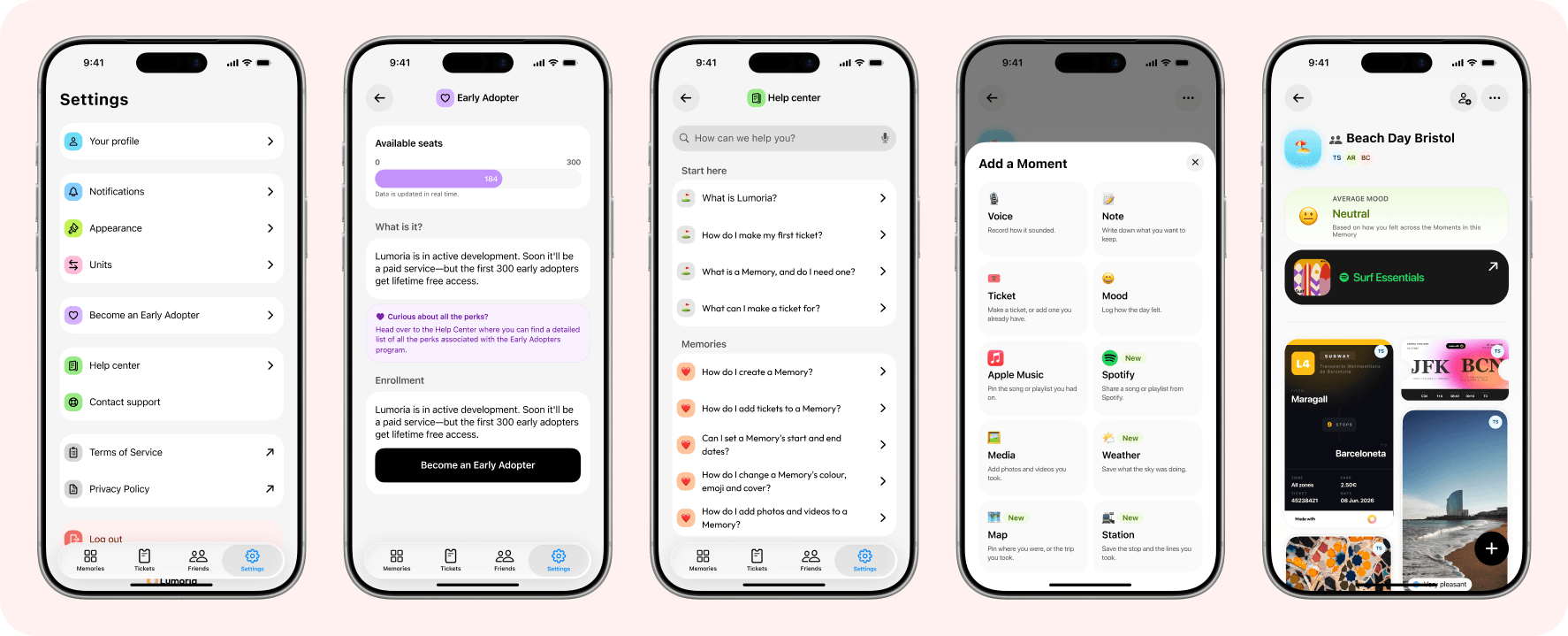
Three new Moments. Two ways to add music.
September 6, 2026
The weather of a day, the places you went, the station you kept coming out of: three new Moments, and every Moment opens now. Spotify joins Apple Music, by link. Plus a Help center in the app, rebuilt Settings, and two new app icons.
Weather, maps and stations
Three new Moments for a Memory. The weather of a place and an hour, on a card coloured by the temperature or filled with a painting chosen for the sky. A map of where you were, or a journey across up to six stops. And the station you came out of, with up to four of its lines in the network's own colours, taken from the operator's own map.
New featuresImprovements
Tap a Moment, it opens
Every Moment opens on tap now, with what sits behind it: the stops on a map, the lines and the operator behind a station, the painting on a weather card. It says who added it, and lets you remove it if it's yours. The little info buttons are gone. Photos and videos open full screen, and the Add a Moment sheet says what each kind is for.
New featuresImprovementsDeprecation
Music from Spotify, by link
Apple Music and Spotify now have a tile each in a Memory. Apple Music you search from inside the app, as before. For Spotify, copy a link from its Share menu and paste it in: the song, album or playlist becomes a card in your Memory. No account needed on either side. A Spotify card shows the title and the artwork.
New features
Settings, rebuilt
Settings has been rebuilt. Your account is a page of its own, saving each field as you finish with it, with account deletion at the foot rather than buried in a menu. Your plan gets a card and a sheet, and the Early Adopter programme a screen showing the seats left. Appearance has two new app icons, Moon and Sun. Research is gone from the app.
ImprovementsNew featuresDeprecation
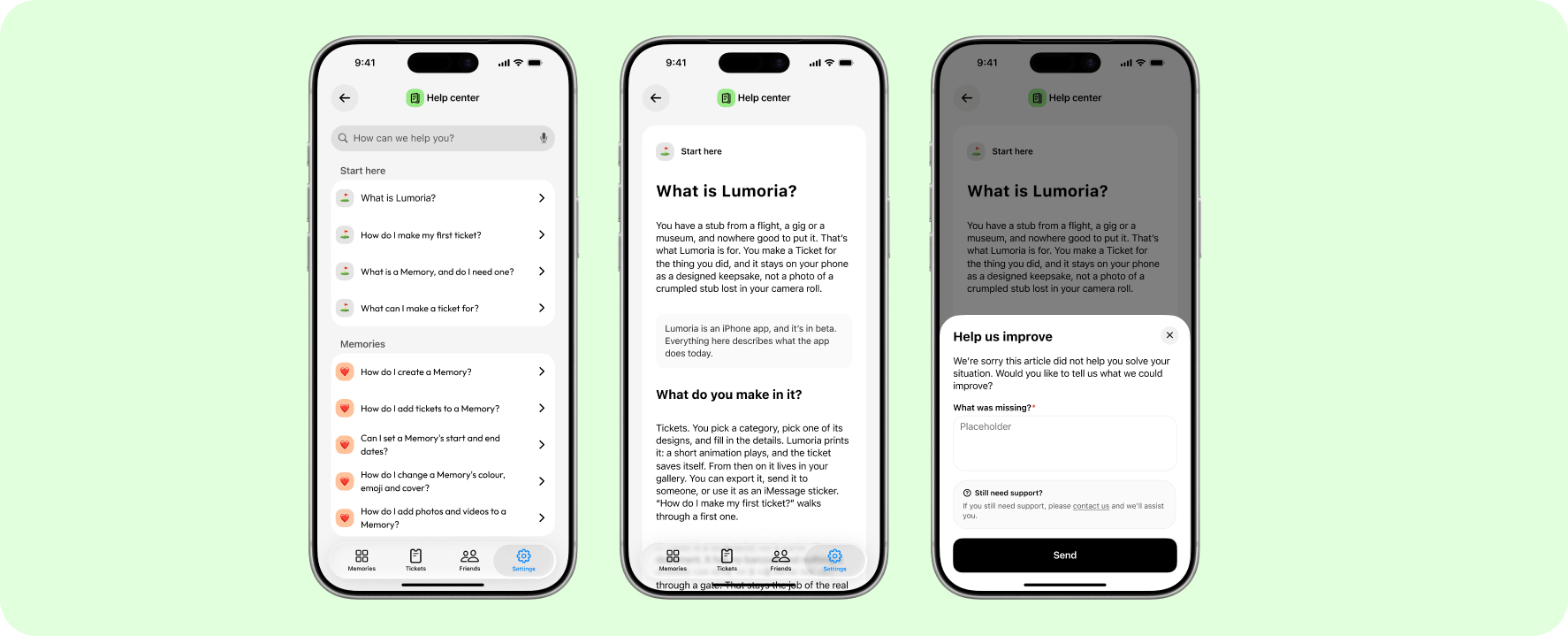
A Help center in the app
59 articles, searchable, in all five languages Lumoria speaks, right there in Settings. They stay readable with no signal, and they refresh themselves without waiting for an app release. The same articles are on the web, linked from every page of a freshly rebuilt site. Tell us at the foot of any article whether it helped, and what was missing if it didn't.
New features
Lumoria says tu, du and tú
In French, German and Spanish, Lumoria used to address you formally on some screens and informally on others. Now it speaks the same way everywhere, the way a friend would. 778 lines were rewritten, screen by screen. Italian already spoke that way.
Improvements
Fixes and refinements
Exporting a ticket at the largest size works again. An update no longer shows the help articles from the build before it. A station card keeps its fourth line badge, the station list scrolls to its last row, and About this Mood draws the card at the size you tapped. The dozen older app icons are gone: a Home Screen on one of them returns to the new default.
Bug fixesDeprecation
Your tickets read like tickets again
August 23, 2026
Ticket faces were printing internal codes where their labels belong. Every template reads real words again: DEPARTS, SEAT, GATE. So does the style picker. Plus secondary text that stays legible on a background you picked yourself.
Real labels on every ticket face
Ticket faces were showing raw internal codes where their labels belong, uppercased and cut off. Every template prints real words again — planes, trains, concerts, films, museums and the underground. The style picker is fixed too, so each swatch reads its style name rather than the code behind it. And the Sign template stopped translating its labels: ticket art stays English wherever you are.
Bug fixes
Fixes and refinements
Pick your own background colour for a ticket and the secondary text keeps its contrast now, instead of fading into the paper or disappearing against the main text. On the web, the Download the App button at the end of the ticket builder is a proper button again, not a bare link.
Bug fixes
Invite anyone. Build Memories together.
August 21, 2026
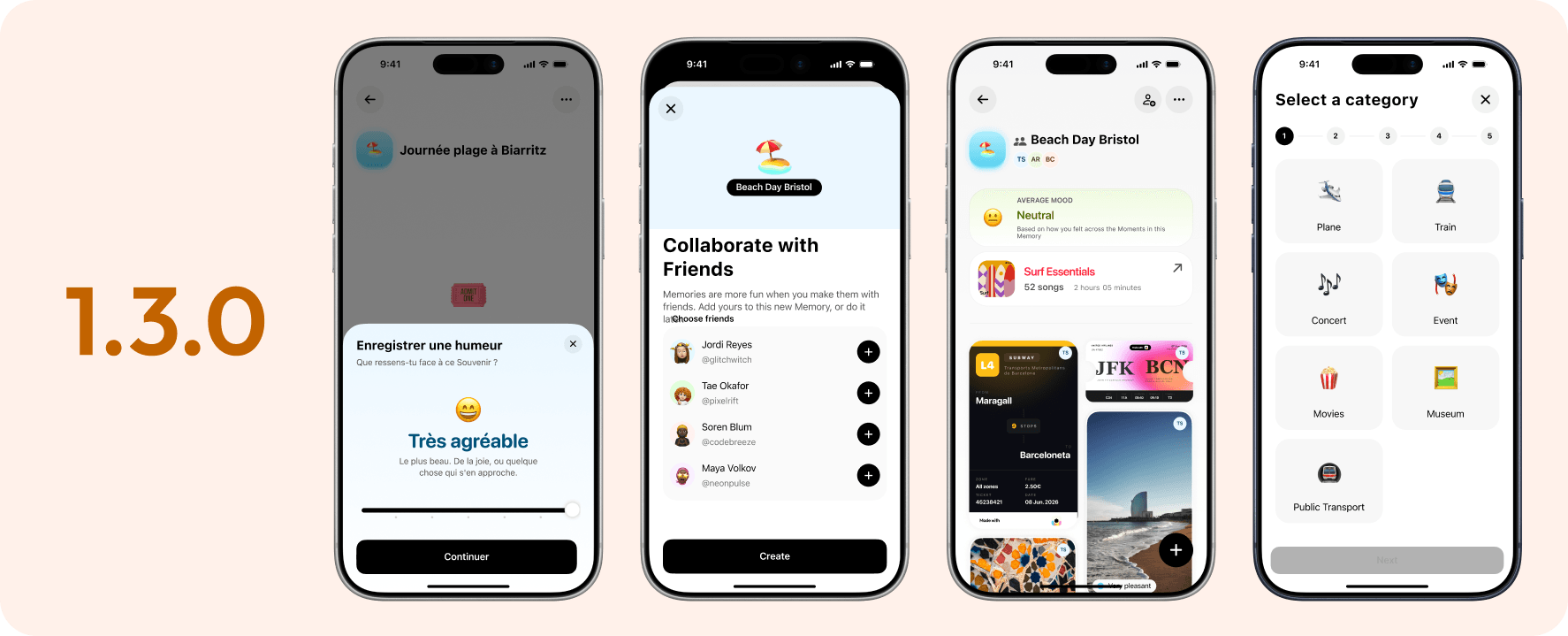
Claim your @username, add anyone by handle, code, email or phone, and turn any Memory into one you build with them, still end-to-end encrypted. Plus a first run that takes twenty seconds, one sheet for everything you add, and a brand-new Museum category.
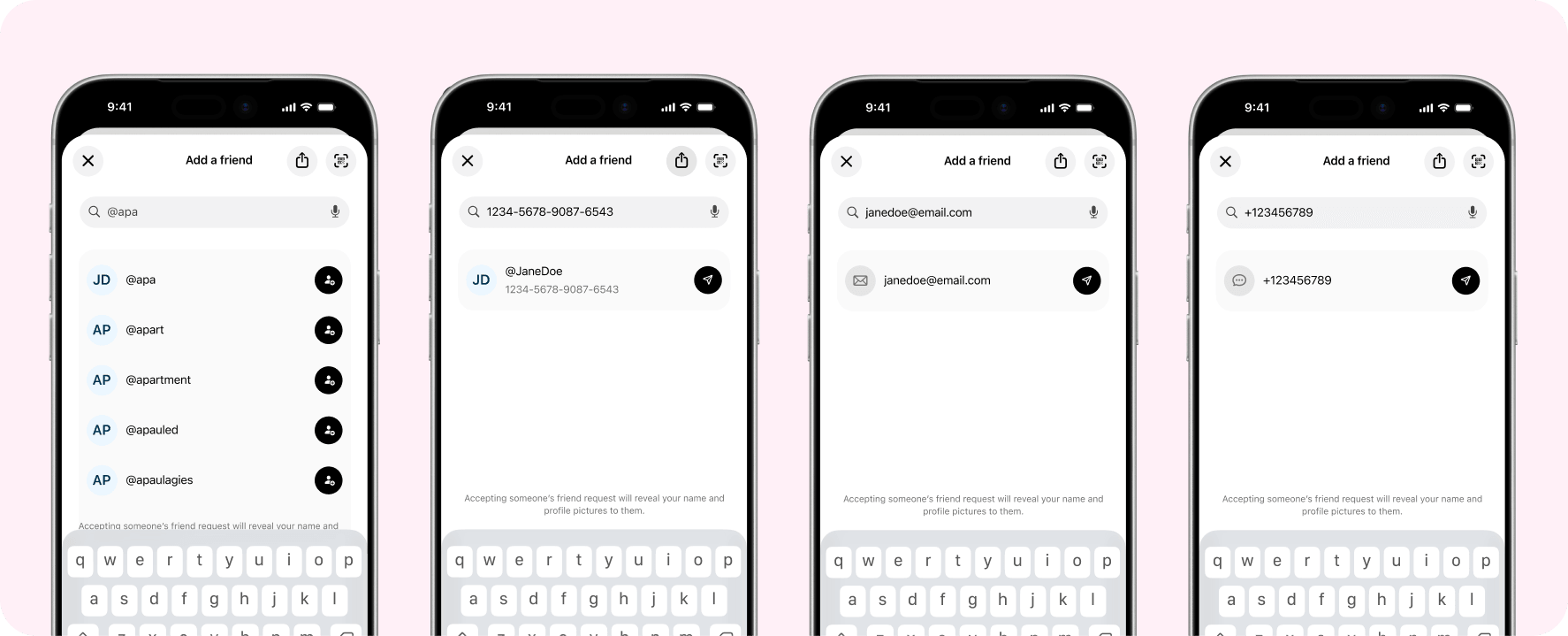
Invite anyone, by handle, code, email or phone
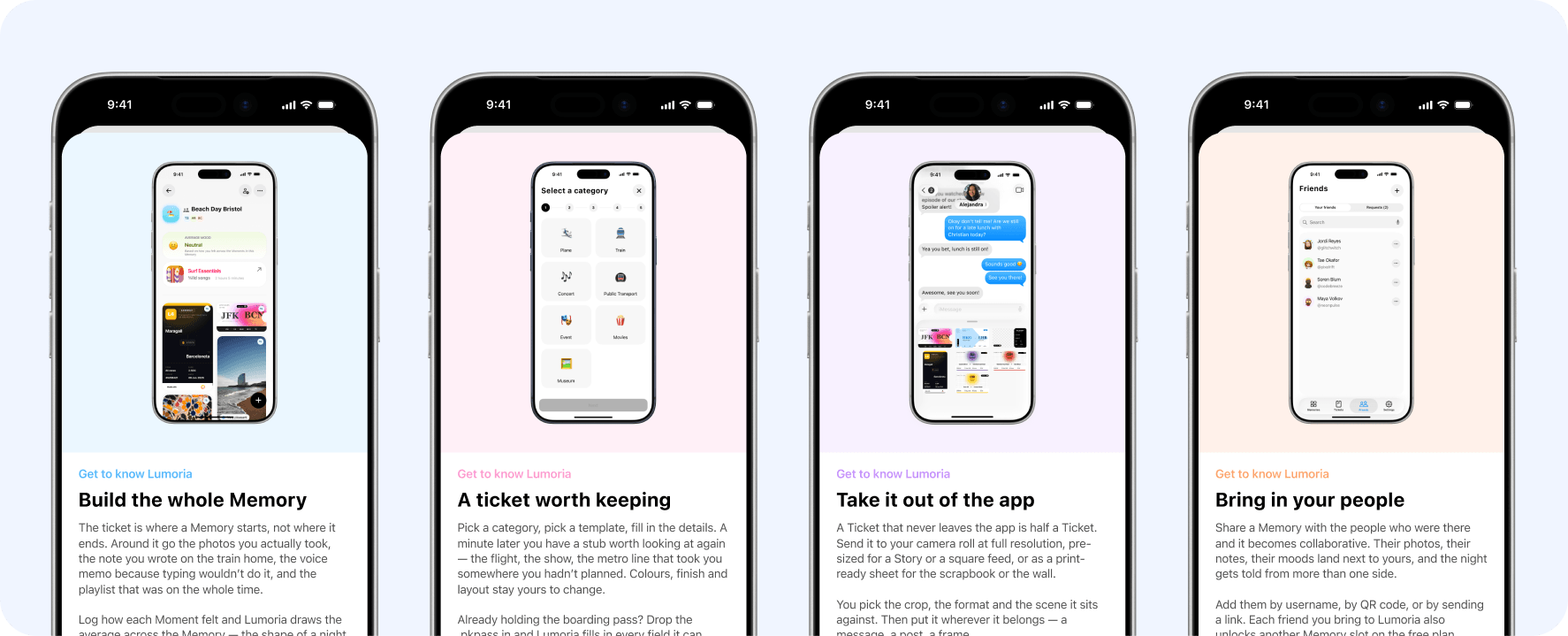
There's a Friends tab now. Claim your @username, then add people by handle, by the code on their card, by email or by phone — or just scan their QR. Not on Lumoria yet? The invitation goes out from your own Mail or Messages, so their address never reaches us. Design your own profile card, collect up to four badges, and your invite reward lands the moment they join.
New featuresImprovements
Memories you build together
Any Memory can be made with other people: new ones in two steps, the ones you already have converted in place, keeping their widgets and favourites while every moment moves across re-encrypted. Everyone's moments appear live, marked with their face. And each Memory now has its own settings behind the “…” — details, look, who's in it, roles, and which notifications it sends you.
New featuresImprovements
Notifications worth turning on
Five new ones: a friend request, an accepted request, an invitation to a shared Memory, someone joining, and a quiet digest when a collaborator adds moments — twelve photos arrive as one card, not twelve. Everything starts off, and a request only ever shows a handle on your lock screen. Push now survives a reinstall and an iOS upgrade too.
New featuresImprovements
A first run that gets out of your way
The ten-step tutorial is gone. New accounts get five cards, about twenty seconds, and signing up fits on one screen — the six-digit code comes to you, no trip to your inbox. Already here? Five one-shot tips point at what moved, without dimming or blocking anything.
New featuresImprovementsDeprecation
One sheet for everything you add
Moods, photos, videos, music, notes, voice memos, tickets and roles all open on the same sheet, sized to what's inside it. Mood is now a seven-stop slider that says what each step means, and the card takes its colour. Photo and Video merged into one Media button. Gone with them: dual-camera recording, and a frame-rate setting nothing ever read.
ImprovementsDeprecation
Museums, real airlines, and a rebuilt web import
A free Museum category arrives with the Modern template, plus 1,200+ museums that fill in the location and pin it on your map. The airline list went from 79 to nearly 1,200 — Transavia, Vueling and Volotea included — the same on web and in the app. The builder gets a real calendar and time wheels that understand overnight journeys, and Import from Web was rebuilt to match.
New featuresImprovements
Fixes and refinements
Big videos now resize instead of failing after the upload. Photos and videos in shared Memories get their rounded corners back, empty Memories show their colour again, and sign-in errors read as real messages instead of footnotes. The “+2 ticket slots” reward finally works, and 680 missing translations landed. Also gone: the tap-the-star hint and the average-mood pill.
Bug fixesDeprecation
Tighter encryption for tickets imported from the web
July 31, 2026
Ticket-import codes are now significantly more resistant to brute-force attempts.
Stronger ticket-import encryption
Strengthened the encryption used when importing tickets from the web Ticket Maker. Codes are now significantly more resistant to brute-force attacks.
Improvements
Hong Kong and Munich board the transit lineup
July 30, 2026
Hong Kong's MTR arrives with bilingual station names, Munich's U-Bahn and trams join the network, and two ticket-builder bugs get squashed.
Hong Kong: 10 lines, 98 stations
Build MTR tickets across all 10 lines and 98 stations, with official line colours and journey planning that knows the Lok Ma Chau and LOHAS Park branches.
New features
Tickets go bilingual
Hong Kong stations render in English and Chinese ("Admiralty | 金鐘") on every public-transit template, and the Sign template puts the Chinese line name — 東鐵綫 — front and centre, just like the real signage.
New features
Munich joins the network
All 8 U-Bahn lines and the full tram network, in MVG's official line colours.
New features
Fixes
Fixed Rhythm concert tickets created on the website never showing up in the app. Fixed part of the Sign ticket lighting up when tapped while choosing a layout in the ticket builder.
Bug fixes
Meridian traces the flight you actually took
July 28, 2026
A new animated map template, real venue search for concerts, and tasteful placeholders for unfinished tickets, plus Import from Web now covers every template on the site.
Meridian: a ticket that traces your flight
A new animated dotted-world-map boarding pass template that draws the real path between your departure and arrival airports.
New features
Real venue search for concerts
Search stadiums, arenas, and theatres by name when building a concert ticket, so every ticket carries the exact venue instead of a rough guess.
New features
Tasteful placeholders for unfinished tickets
Leave optional details blank while building a ticket and we'll fill them with tasteful placeholders so it never looks unfinished. Edit them anytime.
Improvements
Import from Web: all 22 templates
Import from Web now supports all 22 website ticket templates, up from 6, including trains, public transit, movies, and opera.
New features
Fixes
Fixed imported transit tickets missing their City/From/To on the map. Multi-leg transit trips now import as a single code instead of failing after too many redemption attempts. Fixed a bug that let premium templates be imported for free from the website.
Bug fixes
Import from Web brings your browser-built tickets into the app
July 20, 2026
This release connects the new web ticket builder to the app: design a ticket in your browser, redeem it with a code, and it arrives fully formed, photo and all, with everything decrypted only on your device.
Import from Web
A new Import from Web option in the tickets tab's menu lets you redeem a ticket built on Lumoria's browser-based builder. Enter the code from your session and the ticket — including Arena and Chorus templates — lands directly in your gallery, fully formed.
New featuresBeta
Your photo, decrypted only on your device
Photos you choose in the web builder are encrypted before they ever leave your browser. The app decrypts them locally during import, so your photo is never stored or readable anywhere in between.
New features
A steadier import path
Fixed a handful of edge cases in the new import flow, including a stale draft overwriting a fresh import and an import sheet that could dismiss before it finished.
Improvements
New concert templates, Opera, and notifications in your language
July 16, 2026
This release reworks Arena around your own photo, adds three new premium concert templates (Chorus, Arpege, and Rhythm) with colors that match your photo automatically, brings back the Event category with a new Opera template, and gets your throwback and getting-started notifications speaking French, German, Italian, or Spanish.
Arena, reimagined with your photo
Arena now builds itself around a photo you choose — pick one when you create the ticket and it fills the stub, cropped to fit, alongside the artist, tour, date, and your section, row, and seat. Still free for everyone.
Improvements
Chorus, Arpege & Rhythm
Three new Concert templates for Early Adopters, each centered on your own photo. Chorus frames it in a rounded card above the details, Arpege runs it full-bleed under a soft gradient, and Rhythm keeps it to just the photo, artist, tour, and date.
New features
Colors that match your photo
Arena, Chorus, Arpege, and Rhythm can now pick up their background color straight from your photo — or you can choose one of the photo's other standout colors, black, white, or any custom color. Free for everyone, on every one of these templates.
New features
Opera revives the Event category
A new formal, maroon-and-gold Opera template for operas and ballets brings back the Event category. Pick a well-known work from the built-in repertoire or type your own, and Lumoria fills in the season, while doors, interval, and curtain times, plus your row and seat, complete the ticket.
New features
Localized push notifications
Throwback and getting-started notifications now arrive in your device's language instead of always in English. Lumoria picks up your language automatically on launch — from French, German, Italian, or Spanish — so there's nothing to turn on.
Improvements
Lumoria speaks French, German, Italian & Spanish
July 5, 2026
This release makes Lumoria fully multilingual, adds two new ticket templates, and gives profile and ticket editing a round of polish.
Full localization
Lumoria is now available in French, German, Italian, and Spanish alongside English. Every screen — onboarding, your gallery, the ticket builder, memories, settings — follows your device language, including system permission prompts. Dates, numbers, and pluralized counts (moments, songs, stops, tickets, seats) now format correctly for your language, and the app picks it up automatically from iOS.
New features
Lollapalooza concert template
A new Concert template for Lollapalooza, available in seven city editions — São Paulo, Santiago, Mumbai, Buenos Aires, Berlin, Chicago, and Paris. Each city stub shows a grayscale aerial photo of the festival grounds, with the real dates, venue, and your row and seat locked in. Available in both horizontal and vertical layouts.
New features
Polka transit template
A new Transit template, Polka — a clean white card that colors itself entirely from your line's color. Station names, the line label, and the soft dot cluster all shift shade automatically, so every line gets a cohesive look that stays legible no matter how bright or pale the color is. Available in both horizontal and vertical layouts.
New features
Profile & ticket editing polish
Reworked profile editing with a new cover-photo reposition tool, and a locked-fields banner on ticket forms so it's clear which details are fixed to the real event.
Improvements
Push notifications that actually reach you
June 11, 2026
This release fixes the notification pipeline so on-this-day throwbacks, getting-started nudges, and the categories you switch on all arrive as real push notifications. It also brings more reliable voice memos, smoother ticket animations, and a round of accessibility and polish fixes.
Push notifications
Notifications used to show up only inside the app, never on your lock screen. We rebuilt the delivery pipeline end to end, so throwbacks, nudges, and the categories you have switched on now arrive as real push notifications. Your notification feed and badge also stay current without opening the tab.
New features
Voice memos
Voice memos are more dependable now. They play even with the silent switch on, reset cleanly when they finish, and a stalled recording can no longer get stuck transcribing forever.
New features
Performance & polish
Ticket finish animations are lighter on the battery, the Notifications and Appearance toggles read properly with VoiceOver, and a handful of paywall and restore-purchase edge cases are fixed.
Improvements
Pride app icons & smoother scrolling
June 9, 2026
This release adds a brand-new collection of Pride app icons to make Lumoria feel more like yours, alongside a handful of refinements: playlist creation now behaves the way it should, and scrolling stays smooth even on older iPhones.
Pride app icons
Celebrate with a brand-new collection of Pride app icons. Swap your home-screen icon for one that fits the moment — there are nine new alternates to choose from, each wired into the app so the switch is instant.
New features
Playlist creation
Building a playlist is smoother now. Search results in the new-playlist sheet scroll properly instead of getting stuck behind the dismiss view, so you can browse the full list and pick exactly the tracks you want.
New features
Performance
Scrolling on the homepage is noticeably smoother, especially on older iPhones. We tuned the rendering so the feed stays responsive no matter how far back your device goes.
Improvements